Feature
Your YouTube Music stats, any day of the year
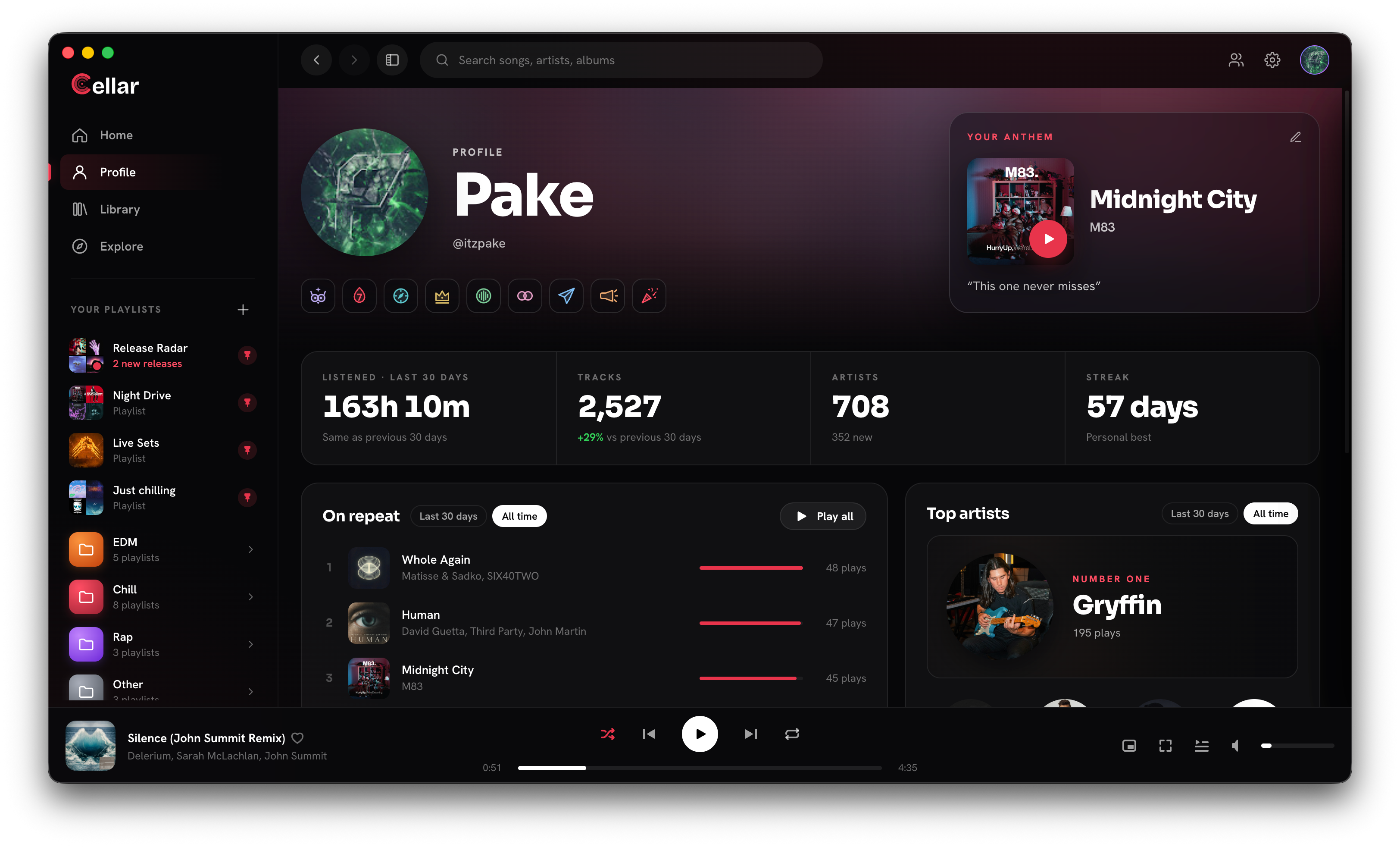
Most people only see their listening numbers in a once-a-year recap. Cellar gives you a profile that is always up to date: how much you listened, what is on repeat, who your top artists are and how long your streak has run.
Free for macOS (Apple Silicon), Windows, and Linux. Needs a YouTube Music account.
The numbers
- Listened: your listening time over the last 30 days, compared with the 30 days before.
- Tracks: how many songs you played, and the change against the previous 30 days.
- Artists: how many different artists you heard, and how many of them are new to you.
- Streak: how many days in a row you have listened, with your personal best.
Listening time counts what you actually heard. Play two and a half minutes of a four minute song and skip, and two and a half minutes count; ten minutes of a two hour DJ set count as ten minutes. Livestreams add to your listening time but not to your track count.
On repeat and top artists
- On repeat lists your five most played songs with their play counts. Switch between the last 30 days and all time.
- Click any song to play it with the rest of the list after it, or Play all to queue them.
- Top artists puts your number one artist up front with their play count, with its own last 30 days and all time switch.
- Recently played lists your latest songs, and Play these queues them all.
Anthem and badges
Pick an anthem, the song that sums you up, and add a line about it. It sits at the top of your profile; while you are playing something, the card shows that instead. No anthem yet? It shows your most played song of the last 30 days.
Badges unlock as you listen: Night Owl for late nights, Streak 7 for a week in a row, Explorer for 100 different artists, Superfan for 100 plays of one artist, Marathon for 50 plays in a day, plus badges for adding friends, sharing songs and hosting a Listening Party. Click a badge to see when you earned it.
Visit your friends
Your Cellar friends can open your profile, and you can open theirs: their stats, their On repeat, their anthem, and what they are playing right now, with a button to listen along. Open your own profile from Profile in the sidebar, the account menu, or Cmd+K and "Open my profile".
Questions
Can I see my YouTube Music stats outside of Recap?
Yes, with Cellar. Your profile shows listening time, top songs, top artists and streaks for the last 30 days and all time, updated as you listen.
Who can see my profile?
You and the friends you have added in Cellar. Remove a friend and they can no longer open it.
Do my plays also go to Last.fm?
If you connect Last.fm or Libre.fm, yes. Cellar's own stats work without either, and the two run side by side.
Cellar works with a free or Premium YouTube Music account. YouTube Premium perks (including ad-free listening) stay with Google. Cellar is an independent project and is not affiliated with, or endorsed by, YouTube or Google.